
Engagement scores are a single measure of engagement that blends many metrics together. They make your analysis simple by focusing on one number, but still comprehensive and customized to your publication because you can choose the components that matter to you.
An engagement score can include all kinds of metrics (pageviews, reading time, shares, etc.) about any audience segment, from any analytics platform. Each individual metric of a score can be given a weight as part of the score's calculation.
Some scores are generated automatically which you can then customize. For example, some Loyalty Stages and Audiences will generate an engagement score once you create them.
You can also build scores from scratch. Go to Settings, and under Analysis, select Engagement Scores to view and manage the metrics and weights for each score.
Here is an example engagement score:
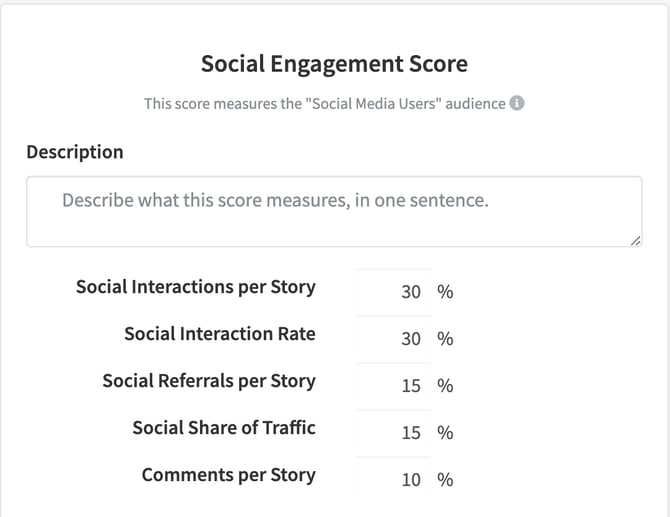
This engagement score blends various social interactions to provide a more comprehensive social engagement score.
Engagement scores measure how content performs in comparison to the average engagement with content from the past, known as your baseline.
Scores are displayed within a rating system scale, and you can select between the two:
- 0 - 100 scale
- score >= 75 -> Excellent (Green)
- score >= 50 -> Good (Green)
- score >= 40 -> Average (Yellow)
- score < 40 -> Low (Red)
- 0 - 300 scale
- score >= 150 -> Excellent (Green)
- score >= 100 -> Good (Green)
- score >= 80 -> Average (Yellow)
- score < 80 -> Low (Red)
Whichever scale you want to use is up to you! The 100 scale is easier to understand for most folks, while the 300 scale provides more nuance on a story's performance.
To select the scale, go to Settings > General app settings > scroll to the "Engagement Score settings" section > make your selection > click Save settings.
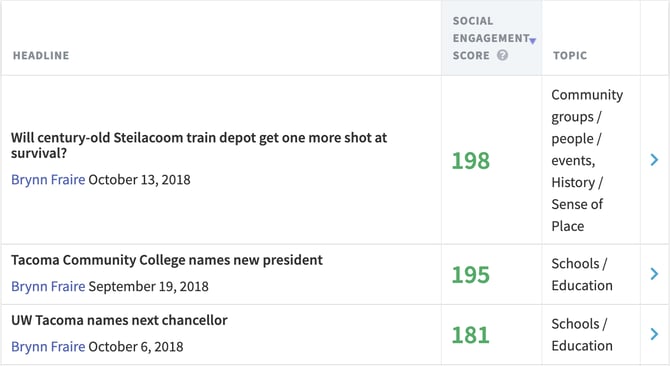
Engagement Scores will be used in your dashboards across Metrics for News.