
One of the basic activities you can do is check on your story’s performance. Let’s walk through how to find a story and view its metrics.
-
Log in to Metrics for News.
-
Click "My Stories" in the navigation bar at the top of the page. Let's tour some essential parts of this page:
- Calendar picker: Use this to filter stories by publish date.
- Newsroom priorities: See how your stories are contributing to each of your newsroom’s goals
- Overall engagement score: The key metric for performance, based on your own custom blend of metrics
- Featured metrics: Highlighted metrics selected by your newsroom
.jpg?width=670&height=377&name=Dashboard%20Guide%20(1).jpg)
- Trends: Saving you time by using machine learning to surface trends relevant to your stories.
- Your stories: With the highest engagement scores at the top
- Loyalty stages: Look for these loyalty flags to tell you which stories are a standout to audiences in your funnel
-
Using the calendar picker, select a date range that includes the publish date for your story, then click "Apply".
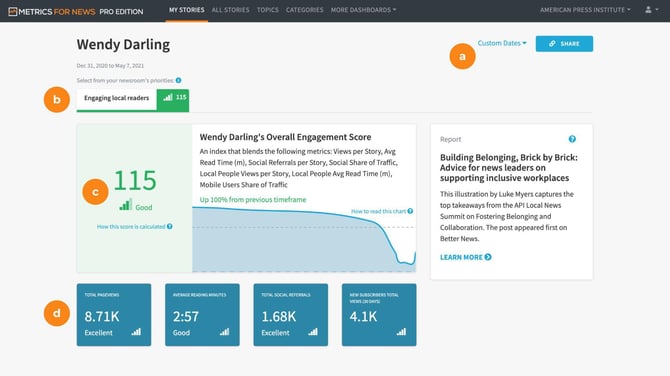
- Select one of your stories to view its individual metrics. A few highlights for this page:
.jpg?width=670&height=377&name=Dashboard%20Guide%20(3).jpg)
- Engagement score calculation: Click “How this score is calculated” to see a breakdown of this story’s engagement score
- About this story: Highlighted characteristics from your story
.jpg?width=670&height=377&name=Dashboard%20Guide%20(4).jpg)
- Comparisons: See similar stories and how they compare to help with your analysis
Next: Speaking of experimentation, let's look at some ways to run them. (3/5)